When adoption fails, it’s rarely about the technology — it’s almost always about people.
Adoption is a Key Driver of ROI
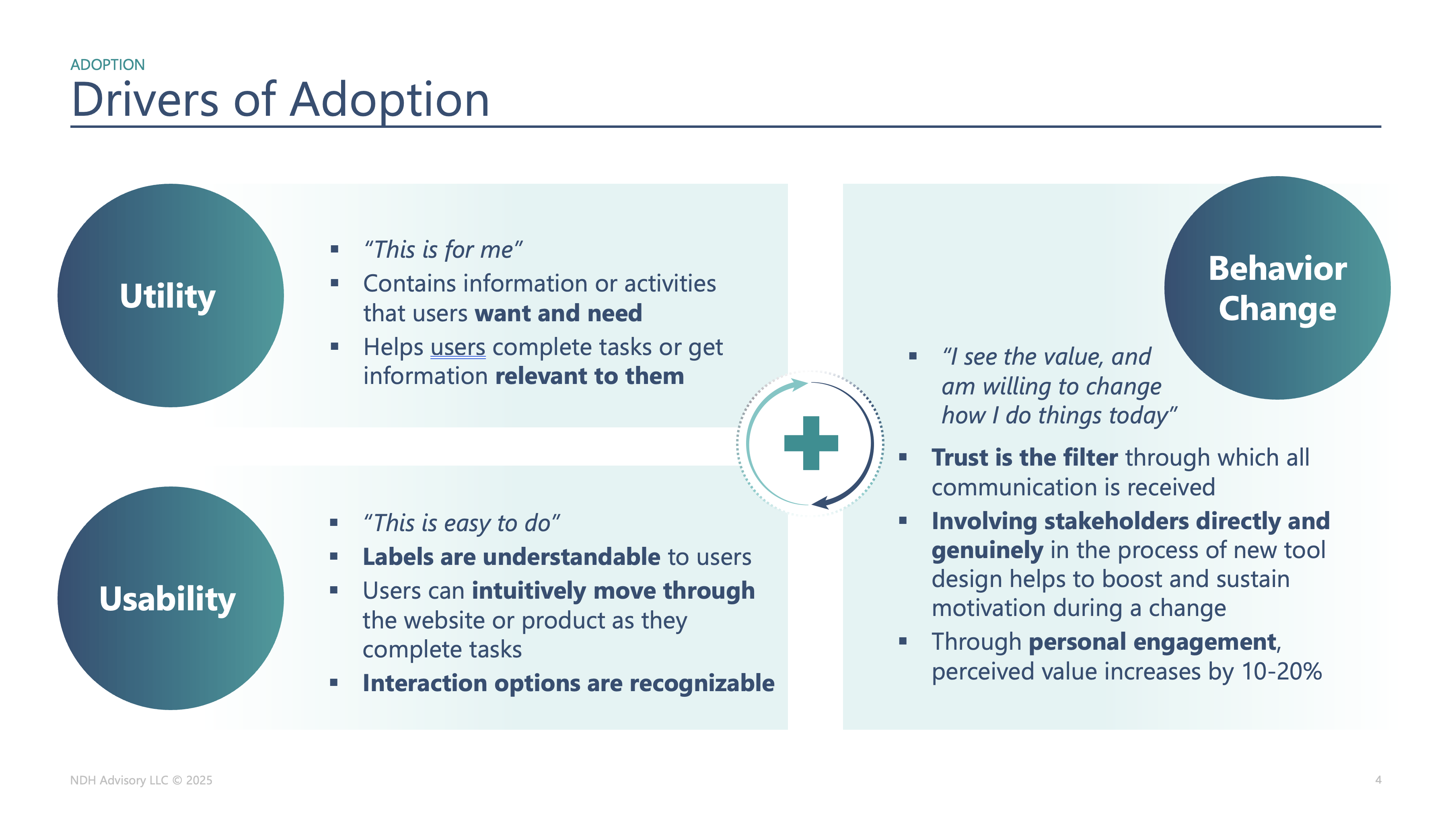
The slide that anchors this post breaks adoption into three drivers which I have found to be at the root of most adoption issues I’ve been asked to address – Utility (“this is for me”), Usability (“this is easy to do”), and Behavior Change (“I see the value and I’m willing to change how I work”). In this post, I will address each of these areas of risk with the goal of making the concepts accessible to anyone who doesn’t necessarily have expertise in anthropology, design, or behavior change.
In my 20+ years building software, I haven’t built as many new solutions as you might expect – more often than not I’ve been asked to address concerns with a software solution that has failed to meet expectations in some way. Unfortunately, it’s often at the eleventh hour. Clients reach out because they are understandably worried about ROI, which can’t be achieved without adoption. I’ve observed other consultants recommend “aligned incentives” or “a strong launch and communications plan”, which are necessary but often missing the point; adoption is a human behavior problem.
Utility: “This Is For Me”
In the fields of Human-Computer Interaction (HCI) and User Experience (UX), utility and usability have specific meanings. Utility asks “does it do the right thing?”, while usability asks “can people do it easily?”. These distinctions are important when you’re trying to explain why solutions designed around new technologies don’t gain traction.
Utility is often the biggest blind spot for founders and product leaders. They recognize that the idea is good for them – for their workflow, their body, their level of expertise – but they unwittingly make assumptions that everyone else’s needs are the same. The elite athlete builds for other elite athletes, then discovers that the market opportunity is a set of time-starved weekend warriors with very different goals and constraints.
The good news is that, once uncovered, utility problems are imminently solvable. You do, however, need enough humility and curiosity to ask a few simple but uncomfortable questions:
- Where are we assuming “people like us” instead of understanding the people we actually serve?
- Whose life gets meaningfully better when this feature ships?
- What are they doing instead today, and why?
If you’re struggling with adoption, start by assuming your utility story may need work. “This is for me” is a feeling that emerges when people see their own needs and language reflected back at them.
Usability: “This Is Easy To Do”
Once something is genuinely useful, the next question is whether people can actually use it without frustration. In HCI terms, usability is about effectiveness, efficiency, and satisfaction in a particular context – can people accomplish their goals, with reasonable effort, and feel good afterwards?
Consider:
- At a macro level, how does your product fits into the flow of someone’s day relative to other tools, interruptions, handoffs, or the physical environment?
- At the micro level, do interaction design paradigms, patterns, defaults, and affordances smooth the path or create friction that adds up over time?
A product can be functionally rich and theoretically useful, but if it demands three extra steps in the middle of a call with a patient, or buries the one critical action in an obscure menu, people will quietly work around it. “Nice to look at” does not compensate for “difficult to use.”
A quick usability gut-check for your product:
- Are you clear on the core tasks the solution is designed to support?
- Can new users complete those tasks quickly and without guidance?
- Where do people hesitate, ask for help, or switch to alternative solutions?
- Have you observed them using your solution in a messy, real-life situation?
When “labels are understandable” and “interaction options are recognizable,” the solution is signaling respect for your users’ time and attention beyond learning your product.
Behavior Change: “I See the Value, and I’m Willing to Change”
The third circle on the slide is the one teams tend to underestimate, and it’s often the hardest. Behavior change cannot be an afterthought.
BJ Fogg’s Behavior Model is useful here – for a behavior to occur, people need Motivation, Ability, and a Prompt (Trigger) at the same moment. If motivation is high but ability is low, you get frustration and drop-off. If ability is high but motivation is low, you get polite compliance at best. If you never design thoughtful triggers, people simply forget to engage.
A lot of enterprise change management quietly assumes that communication plus training results in behavior change – update the incentives, send the email, run the training, and call it done. In reality, employees may have no choice but to log into the new CRM, yet still cling to old notebooks, side spreadsheets, and backchannel messaging because the system doesn’t align with how they actually work.
In healthtech, patients cannot be coerced into new habits – you only get the behavior changes that you’ve genuinely supported.
Imagine a patient starting a GLP‑1 medication and being told to “eat more protein” for best results. On paper, the behavior is simple – increase protein intake. In reality:
- Do they know what counts as protein?
- Can they afford healthy high-protein foods on their budget?
- Do they have energy and kitchen access?
- Do they have the time and the knowledge to prepare it?
- What if they’re vegetarian, or have conflicting cultural / religious practices?
They may be highly motivated to improve their health, but a cascade of ability barriers gets in the way – knowledge, resources, skills, environment, identity. A reminder notification or “nudging” message doesn’t fix that on its own; without addressing ability, triggers alone won’t drive behavior change.
This is also where ethics show up. There is a fine line between nudging and manipulation, particularly when people are vulnerable, tired, or scared. Designing for behavior change carries a responsibility; be thoughtful.
The Three-Legged Stool of Adoption
Utility, usability, and behavior change are not three independent checkboxes, they’re more like three legs of a stool – remove one, and the whole thing tips over.
- With strong utility but poor usability, people want what you offer, but using it feels so frustrating that they delay, avoid, or delegate it.
- With strong usability but weak utility, people can ease through your interface, but it doesn’t solve an important problem, so they don’t come back.
- With strong utility and usability but no behavior-change support, you get a spike of interest at launch, then usage quietly deteriorates as old habits reassert themselves.
The slide’s plus sign between the circles is important – adoption happens when users can say “this is for me,” “this is easy to do,” and “I see enough value to change how I work today.” Underneath that plus sign is an understanding people’s contexts, constraints, power dynamics, and motivations – things that result in sustained impact.
If you want to use your adoption issues as a diagnostic, you might start with a quick self-assessment:
- Where do we hear “this isn’t really for people like me”? (Utility)
- Where do we hear “I know it’s better, but it’s just too much work right now”? (Usability)
- Where do we hear “I tried it for a bit, then life got in the way”? (Behavior change)
The patterns in those complaints are telling you which leg of the stool needs reinforcement first.
Practical Next Steps for Founders and Product Teams
You don’t need a massive transformation program to start benefiting from this framework. A few focused moves can shift both your roadmap and your adoption curve.
1. Run a utility interview sprint
Talk to 5–10 current or prospective users about one core job your product claims to help with. Ask:
- “Walk me through how you handle this today, step by step.”
- “Where is it painful, and where does it actually work fine?”
- “If my product disappeared tomorrow, what would you miss, if anything?”
Look for places where real friction exists, and your solution can offer a compelling alternative.
2. Observe real-world usability
Schedule short, informal sessions where you watch people use your product in their actual environment. No pitch, no slides, just:
- “Show me how you’d do [task] right now.” Note moments of confusion, workarounds, or extra steps. Fix major sources of friction before adding new features.
3. Map one behavior using BJ Fogg’s model
Pick a single behavior you care about (logging meals, updating opportunities, reviewing lab results). For that behavior, write down:
- Motivation: Why would this person care enough to do it regularly?
- Ability: What makes it hard – time, knowledge, money, emotional energy, environment?
- Trigger: When and where in their existing routine would a prompt feel timely and helpful?
Design at least one change that lowers an ability barrier and one better, more contextual prompt (trigger).
4. Check the ethics of your “nudges”
For any tactic, consider that sustainable adoption and trust go hand in hand; without trust, no long term relationship will develop. Don’t lose sight of the fact that achieving greater Lifetime Value (LTV) with existing customers is more cost-effective than acquiring new ones.
Ultimately, my goal with this post was to provide a practical approach for ensuring your product will meet the real needs of users, ultimately delivering ROI on your technology investment(s). What adoption challenges are you seeing right now? Does this framework resonate? Let me know in the comments.
Leave a Reply